AI integration architecture for CRM, ERP, and document platforms
By Jeremy Ryan, Founder & CEO · November 2026
AI integration architecture for CRM, ERP, and document platforms should connect intelligence to business systems without weakening the controls that make those systems reliable. The central design principle is simple: AI may interpret, retrieve, recommend, and initiate controlled work, but the CRM, ERP, and document repository must retain authority over their own records and transactions.

For decision makers, the question is not whether an LLM can read a sales note, invoice, or contract. It can. The harder question is whether the architecture can prove what data was used, enforce the right permissions, avoid duplicate financial updates, and recover when one system is unavailable. That is where integration architecture determines whether an AI initiative becomes a dependable capability or another disconnected assistant.
• Set The Ownership Rules Before Connecting AI
• Build The Integration And Retrieval Layer
• Separate Document Intelligence From Document Search
• Treat AI Actions As Controlled Business Commands
• Sources
Set The Ownership Rules Before Connecting AI
A sound architecture starts with authority, not models. I recommend defining the authoritative owner for every business object, field, and decision before enabling retrieval or write back. This prevents a common failure mode: the CRM says an account is active, the ERP says its credit hold is unresolved, and a document platform contains a signed amendment that has not yet been entered anywhere else. An AI assistant cannot safely resolve that conflict by choosing the most persuasive text.
A system of record is the application that owns a business object or transaction. In many organizations, the CRM owns opportunity activity and customer engagement. The ERP owns invoices, inventory, payment status, and financial posting. A document platform owns the original contract, policy, or correspondence file. Ownership can be more granular than an entire customer record. For example, CRM may own a sales forecast while ERP owns the approved billing schedule.
Create A Field And Decision Ownership Matrix
The ownership matrix should identify the source, update authority, freshness expectation, and conflict rule for significant information. Without it, integration becomes a collection of connectors that silently compete with one another.
| Business Element | Typical Authority | AI Access Pattern | Write Back Rule |
|---|---|---|---|
| Customer engagement notes | CRM | Read and summarize | Draft only, then user approval |
| Invoice amount and payment status | ERP | Exact API lookup | No model generated changes |
| Contract clauses | Document platform | Retrieve source passages | Create review task, not silent update |
| Product availability | ERP or inventory service | Real time structured query | No direct write from AI |
| Customer classification | Defined business owner | Read evidence and recommend | Controlled workflow approval |
This matrix also gives teams a practical way to define conflict handling. If a contract indicates a negotiated discount but ERP has not received an approved adjustment, the answer should identify the discrepancy and route it to the accountable workflow. It should not present an unapproved document clause as an active financial fact.
AI can summarize disagreement across systems. It should not quietly erase disagreement.
This discipline becomes even more valuable in environments that also use distributed ledgers, tokenized records, or identity systems. The design issues overlap with blockchain integration architecture for ERP, CRM, and identity systems: provenance, authority, access control, and reconciliation matter more than a fashionable connector.
Preserve Authorization Through Every Layer
A user’s CRM role or document permission cannot stop at the application user interface. Authorization needs to travel with the request into indexing, retrieval, model context, tool calls, and generated responses. Otherwise, an employee who cannot open a confidential contract in SharePoint could still receive its contents through an AI search interface.
In practice, this means each indexed document chunk should retain security metadata such as repository ID, document ID, tenant, classification, group membership, and allowed users or roles. Retrieval should apply these filters before text reaches the model. The same principle applies to CRM and ERP APIs: use a delegated user identity or narrowly scoped service identity, then enforce record and field access in the source system where possible.
Field level controls deserve special attention. A customer service representative may need an account’s delivery status but not its credit limit, payroll information, or internal legal notes. An AI response should be built from only the fields that person is permitted to view. If a platform cannot reliably propagate permissions, keep that content outside the AI retrieval scope until the gap is addressed.
Build The Integration And Retrieval Layer
The most dependable pattern is not one giant “AI brain” connected directly to every database. It is a set of controlled interfaces that separates transactional data access, document retrieval, workflow execution, and model interaction. Enterprise AI integration commonly combines CRM, ERP, data warehouses, document repositories, and custom line of business applications, as described by Radixweb’s overview of AI integration service patterns.
Use APIs, Events, And Data Platforms For Different Jobs
APIs, event streams, and analytical data platforms solve different problems. Choosing one should depend on freshness, reliability, volume, and whether the user needs an answer now.
| Integration Method | Best Use | Avoid It When | Example |
|---|---|---|---|
| Synchronous API | Exact, interactive lookups and validated actions | Source latency is unpredictable or bulk volume is high | Check current invoice status during a service call |
| Event driven processing | New document arrival, status change, asynchronous workflow | The user needs an immediate response | Classify an uploaded claims form |
| iPaaS or middleware | Reusable mappings, legacy connectivity, governed workflows | It adds unnecessary hops for a simple native API | Transform CRM customer data for ERP onboarding |
| Data platform | Historical analysis, broad reporting, feature preparation | Real time transaction truth is required | Analyze renewal patterns across prior periods |
| Retrieval index | Grounded document Q&A and semantic discovery | Exact financial totals or relational joins are required | Find termination clauses across approved contracts |
For an interactive question such as, “What is the current balance on this account?” an API call to the ERP is generally the right answer. A vector search result may be stale, approximate, or disconnected from current ledger status. For, “What recurring concerns appear in the last 200 support emails?” retrieval across permitted documents may be more suitable.
Existing integration infrastructure should usually remain useful. StackAI’s guidance on legacy enterprise AI integration describes a pattern that combines established integration platforms, connectors, orchestration, and data platform tooling rather than requiring wholesale replacement. That is often the lower risk route for SAP, Oracle, Microsoft Dynamics, Salesforce, SharePoint, and custom applications.
Build Hybrid Retrieval Instead Of Vector Only Search
Vector retrieval is helpful for finding semantically related language, but it is not a substitute for structured queries. ERP and CRM questions frequently depend on exact identifiers, dates, amounts, status codes, and authorization predicates.
Consider a request to identify “open invoices over $25,000 for customers whose renewal is due this quarter.” This is fundamentally a structured query involving amounts, dates, relationships, and active statuses. A vector database may help find related account notes or negotiation history, but it should not calculate the official answer.
A hybrid retrieval service generally combines:
• Exact keyword and identifier matching for invoice numbers, customer IDs, and clause names
• Semantic retrieval for related narrative content
• Metadata filters for time range, business unit, document type, and retention status
• Structured API or SQL queries for governed facts and aggregations
• Permission filters applied before results enter model context
The orchestration layer should decide which path to use. If the question asks for a precise operational value, call the source API. If it asks for an explanation supported by documents, retrieve evidence. If it requires both, retrieve the governed structured facts first, then use documents to provide context around them.
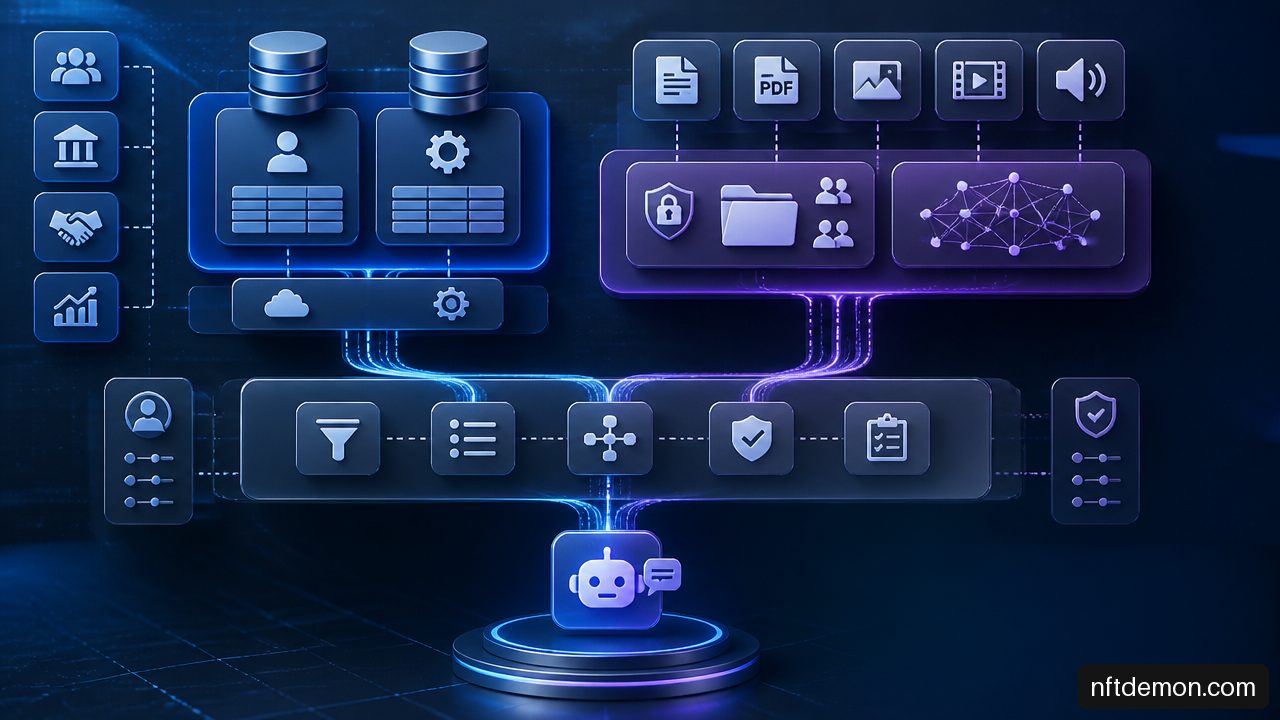
Cloud computing supports this model by allowing separate services for connectors, queues, search indexes, model endpoints, audit stores, and workflow engines. The cloud does not remove architectural responsibility. It makes isolation, scaling, encryption, and observability easier to implement when teams define boundaries deliberately.
For organizations connecting modern and older systems, the same practical distinction appears in how APIs and event streams connect blockchain applications to legacy software. Events are excellent for notifying downstream services that something happened; APIs remain essential when a workflow needs an authoritative response.
Separate Document Intelligence From Document Search
“Document AI” is often treated as one capability. It is actually two distinct patterns with different latency, storage, and governance requirements: transactional extraction and corpus retrieval.
Process A Single Document At Arrival
Transactional extraction handles one document as it enters a workflow. A customer uploads a proof of insurance form, an agent receives a PDF invoice, or a supplier submits a compliance certificate. The system extracts targeted fields, validates them, and starts a business process.
Salesforce Architect documentation on Data 360 Document AI distinguishes this runtime, event triggered single document extraction from pre ingested document processing. That distinction should drive architecture. A runtime pipeline does not need to wait for a large document library to be embedded and indexed before it can act.
A resilient transactional pipeline typically follows these steps:
Receive a document arrival event with a unique event ID.
Store the original file in the approved repository and assign a document ID.
Run classification, optical character recognition where required, and field extraction.
Validate extracted values against format, policy, and source system rules.
Send uncertain, missing, or high impact fields to human review.
Submit an approved command to the CRM or ERP using an idempotency key.
Record the result, source references, reviewer decision, and final transaction ID.
The key distinction is that extraction is not posting. An extracted invoice total may be plausible but still conflict with a purchase order, tax rule, or duplicate invoice check. The ERP should validate the command using its established business rules.
Index Collections For Research And Assistance
Pre ingested document processing is different. It prepares a governed corpus for search, Q&A, drafting, and summarization. Contracts, policies, past proposals, account correspondence, and operating procedures can be chunked, indexed, and linked to metadata.
Each retrieved passage should carry provenance: document ID, source location, revision, retrieval time, and permission context. This makes answers inspectable. When an AI assistant states that a customer has a 30 day termination right, the user should be able to open the relevant clause rather than trust an untraceable summary.
Stale indexes are an unavoidable edge case. If a contract is revised at 10:05 but the retrieval index refreshes at 10:20, a response at 10:10 may cite an obsolete clause. For high consequence decisions, the architecture should either query the current document repository directly or visibly label the indexed version and timestamp. There is no universal benchmark for an acceptable freshness interval; it depends on the business consequence. A legal approval flow may require immediate reindexing, while a knowledge base may tolerate scheduled updates.
Treat AI Actions As Controlled Business Commands
The safest early use cases are read oriented: summarization, classification, retrieval, drafting, and routing recommendations. The risk increases when AI can change a customer record, create an order, alter a payment status, or initiate an ERP workflow. I recommend treating every AI initiated update as a controlled command, not as ordinary generated text.
Put Validation Between The Model And The Transaction
A model may propose a structured payload, but an action service should validate it before execution. This service can enforce schema requirements, business rules, authorization, reference data checks, approval requirements, and allowed state transitions.
For example, an AI assistant may draft a CRM update stating that a customer agreed to a renewal date. Before writing that date, the action service should confirm the account ID, check whether the user has permission, determine whether a signed document is required, and reject a conflicting or duplicate update. The model’s output is an input to the workflow, not the workflow’s final authority.
A centralized model control layer is also useful. EnactOn’s description of an LLM gateway identifies model routing, authentication, rate limits, cost tracking, logging, and content filters as functions that can be centralized. For enterprise teams, this prevents each application team from independently embedding credentials, bypassing logging, or applying inconsistent policies.
Design For Retries, Partial Failure, And Reconciliation
Multi system workflows fail in partial ways. The CRM write may succeed after the document repository update times out. An event may be delivered twice. A downstream ERP service may be unavailable after a customer received a confirmation message. These are normal distributed system conditions, not exceptional implementation details.
The architecture should include:
• Idempotency keys so repeated action requests create one intended effect
• Correlation IDs that follow a request from retrieval through approval and execution
• Dead letter queues for failed events requiring inspection or replay
• Compensating actions where a prior update must be reversed or flagged
• Reconciliation jobs that compare intended commands with completed CRM and ERP transactions
• Explicit status states such as pending, approved, submitted, completed, failed, and reconciled
Do not assume a technical rollback is always possible. A posted financial transaction may require a formal reversal rather than deletion. A customer notification may be impossible to retract. In these cases, recovery should create a visible exception case with accountable ownership.
This is where security and scalability architecture becomes inseparable from AI integration. The principles behind enterprise blockchain architecture focusing on security and scalability are relevant here as well: secure identity, durable audit evidence, controlled throughput, and clear failure recovery are architectural requirements, not optional features.
Measure Business Correctness, Not Just Model Quality
Model accuracy alone is insufficient. A well phrased answer can still cite an unauthorized document or initiate an incorrect update. Measure the workflow at several levels.
| Metric | What It Reveals | Example Response If It Degrades |
|---|---|---|
| Extraction field accuracy | Whether documents yield reliable structured values | Raise review thresholds for weak fields |
| Unauthorized disclosure rate | Whether permissions survive retrieval | Suspend affected index scope and investigate filters |
| Action success rate | Whether validated commands complete | Inspect connector, schema, and workflow errors |
| Reconciliation rate | Whether intended and posted transactions match | Hold further automation for mismatched transaction types |
| End to end latency | Whether the experience meets operational needs | Move noncritical work to asynchronous processing |
| Human review rate | Whether automation is appropriately calibrated | Separate difficult document classes from routine ones |
Published, comparable production benchmarks across CRM, ERP, and document AI workflows remain limited. Teams should establish baselines during controlled rollout rather than adopting generic performance claims. A document extraction system might achieve strong results for standardized supplier invoices and weak results for handwritten exceptions. Reporting both categories is more useful than reporting one blended score.
Key Takeaways
• Keep CRM, ERP, and document platforms authoritative for the records and transactions they own.
• Define field level ownership and conflict rules before enabling AI write back.
• Use APIs for real time facts, events for asynchronous work, and retrieval indexes for permitted narrative content.
• Apply authorization before retrieval and before tool execution, not only in the user interface.
• Separate runtime document extraction from pre indexed document search because their latency and workflow requirements differ.
• Route AI generated changes through validation, approvals, idempotency controls, and reconciliation.
• Evaluate unauthorized disclosure, transaction reconciliation, and action success alongside model quality.
Frequently Asked Questions
What Is The Best Reference Architecture For Connecting AI To CRM, ERP, And Document Platforms?
Use systems of record as the authoritative layer, controlled APIs and events for integration, a governed retrieval service for documents, an LLM gateway for model controls, and an orchestration layer that selects tools and workflows. Keep direct model access to production databases and unrestricted write endpoints out of the design.
Which System Should Be The Source Of Truth When CRM, ERP, And Documents Conflict?
The answer depends on the business object and field. ERP commonly controls financial posting and inventory facts, CRM controls customer engagement activity, and the document platform controls original files. Where evidence conflicts, surface the discrepancy and route it for resolution rather than letting AI decide silently.
Should Enterprise AI Use APIs, Middleware, Events, Or A Data Warehouse?
Use all four selectively. APIs suit exact live queries and controlled actions. Events suit asynchronous document and workflow triggers. Middleware supports transformation and mixed legacy estates. Data warehouses support historical analytics. Avoid using a warehouse or vector index as the authority for live financial decisions.
When Should A Document Be Indexed For Retrieval Rather Than Processed Immediately?
Index documents when users need ongoing search, Q&A, drafting, or cross document analysis. Process immediately when a single uploaded or received document must trigger extraction and a workflow. An invoice arriving for accounts payable is a transactional case; a contract library used for legal research is a retrieval case.
How Can Document Level Permissions Be Preserved In AI Search?
Store permission metadata with indexed content, filter before retrieval, use the requester’s identity or a constrained delegated identity, and validate permissions again for any source link or action. Do not rely solely on a front end control that hides documents after the model has already received their text.
How Do You Prevent AI From Writing Incorrect Data Into ERP Or CRM?
Place an action service between the model and the business application. It should validate schemas, permissions, state transitions, duplicate conditions, source evidence, approval rules, and idempotency keys. High impact actions should remain subject to human approval until measured reliability supports wider automation.
Is A Vector Database Enough For CRM And ERP Search?
No. Vector search is useful for narrative similarity, but structured enterprise questions often require exact identifiers, joins, numeric thresholds, dates, and status filters. Use hybrid retrieval that combines semantic search with metadata filters and structured queries against authoritative services.
Sources
• Salesforce Architect — Data 360 Document AI: https://architect.salesforce.com/docs/architect/fundamentals/guide/data360-document-ai.html
• Kellton — How Generative AI Is Transforming Enterprise Resource Planning: https://www.kellton.com/kellton-tech-blog/ai-driven-erp-generative-ai-enterprise-resource-planning
• EnactOn — How to Integrate Generative AI into Existing Business Systems: https://www.enacton.com/blog/integrate-generative-ai-into-existing-systems/
• StackAI — Enterprise AI Integration Guide: Connecting to Legacy Systems Without Breaking Everything: https://www.stackai.com/insights/enterprise-ai-integration-guide-connecting-to-legacy-systems-without-breaking-everything
• radixweb.com: https://radixweb.com/services/ai-integration
NFT Demon Holdings helps enterprises scope, evaluate, and build blockchain programs — start with a free evaluation call.
Talk through your use case
Free evaluation call — objective, constraints, and fit, before any proposal.